
Free Sentiment Analyzer
Paste any text and instantly get a sentiment score with emotion breakdown, key phrases, and tone analysis.
A sentiment analyzer gives you a fast first-pass read of how a piece of text sounds, but the useful part is not simply calling something positive or negative. You need to see what drove the result, whether the text is mixed, and whether the classification is reliable enough to act on.
BrandJet's free sentiment analyzer accepts up to 5,000 characters and lets you optionally identify the text as General, Review, Tweet, Email, or Comment. Its current interface returns an overall 0 to 100 sentiment score alongside an emotion breakdown, key phrases, tone analysis, and formality information. (BrandJet Sentiment Analyzer)
Use the free analyzer when you need to inspect one review, message, social post, email, or comment. Use continuous monitoring when you need to collect mentions automatically, track changes over time, or route sentiment signals into team workflows.
What does this sentiment analyzer return from one piece of text?
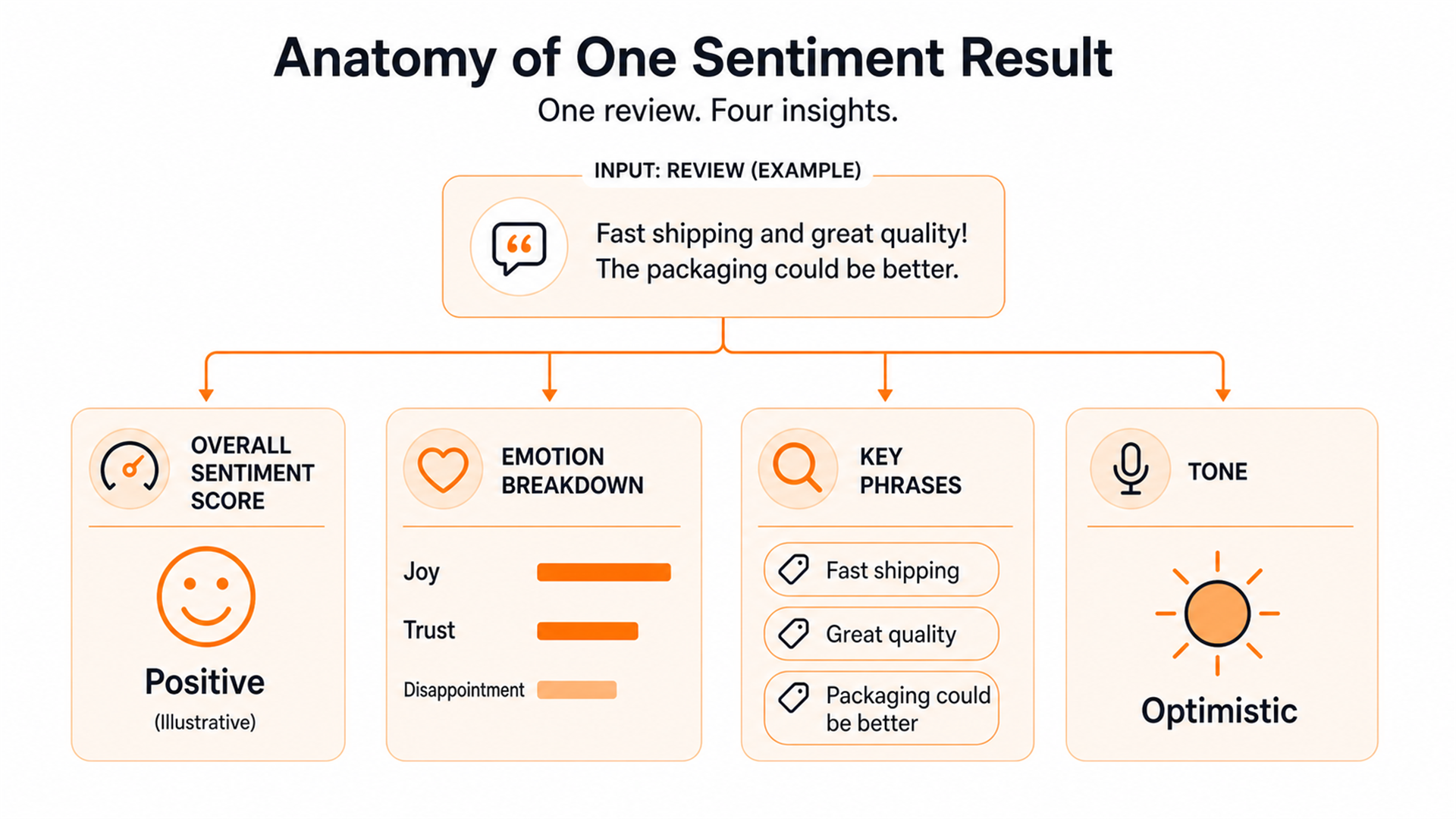
The BrandJet analyzer follows a simple single-text workflow:
- Paste or type the text you want to analyze.
- Optionally choose General, Review, Tweet, Email, or Comment.
- Run the analysis.
- Review the sentiment score, emotion breakdown, key phrases, tone, and formality.
- Use the supporting signals, not just the headline score, to decide what the text means.
These input types and outputs are documented on the current BrandJet sentiment analyzer.
| Output | Best use | Do not assume |
|---|---|---|
| Overall sentiment score | Fast directional read | The number perfectly represents the author's feelings |
| Emotion breakdown | Identify more specific emotional signals | Every emotion label is certain |
| Key phrases | Find wording that explains the result | Every phrase is equally important |
| Tone analysis | Understand how the message is expressed | Tone alone reveals intent |
| Formality | Distinguish conversational from formal language | Formality is positive or negative |
Consider: "The new dashboard is much easier to use, but exporting reports is still painfully slow." A single positive or negative label would hide the useful distinction. The dashboard is praised, while the export workflow is criticized.
How should you interpret a 0 to 100 sentiment score?
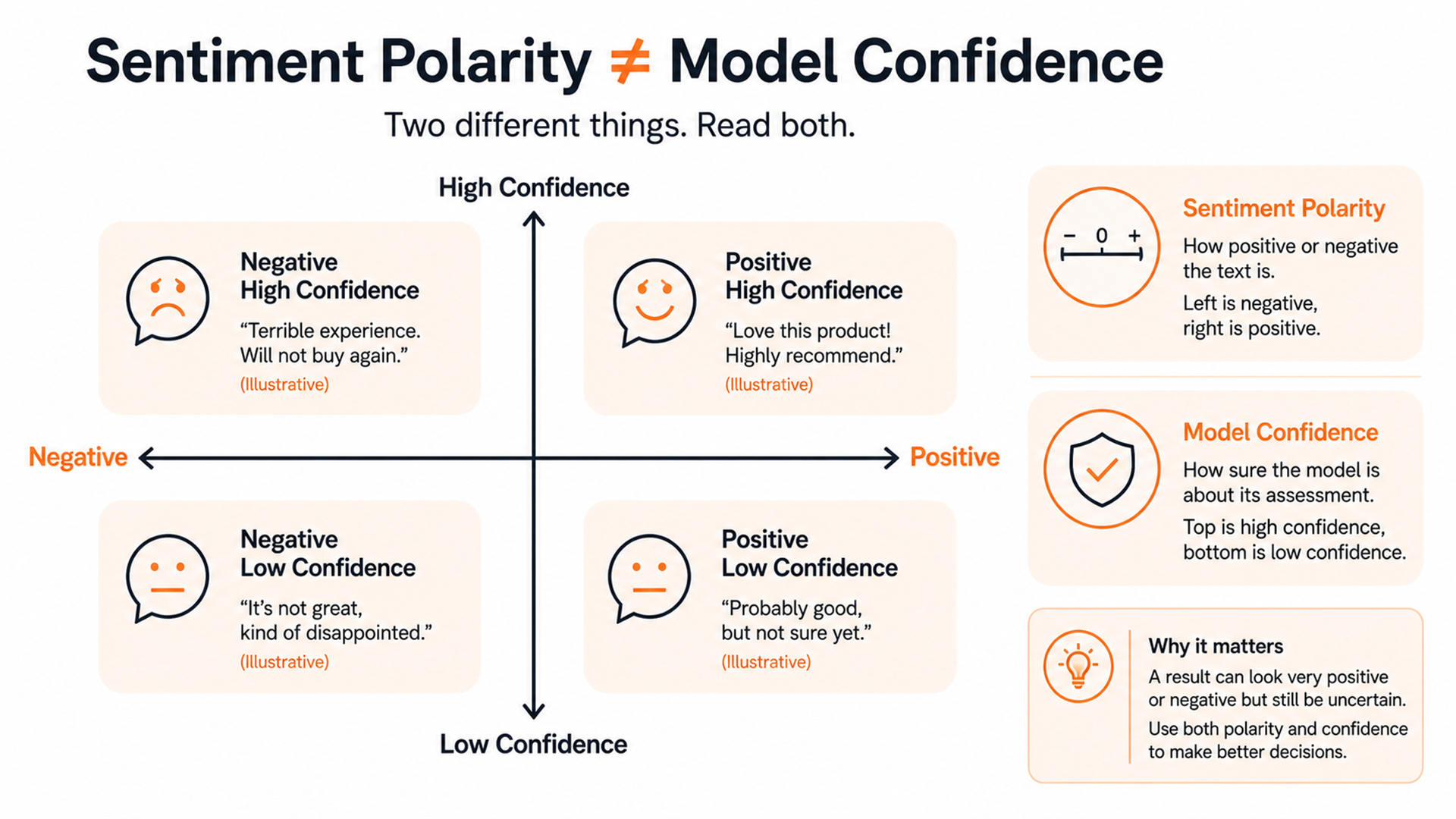
BrandJet describes its overall scale as running from 0, very negative, to 100, very positive. Treat that number as a summary of the analyzer's interpretation, not an objective measurement of emotion.
Different sentiment systems use different scoring models. Google Cloud Natural
Language returns a sentiment score where values above zero
indicate positive sentiment and values below zero indicate negative sentiment.
It separately reports magnitude, which represents the amount of
emotional content detected. (Google Cloud Natural Language)
Amazon Comprehend takes another approach. Its standard sentiment analysis can classify text as positive, negative, neutral, or mixed and returns confidence scores for those classes. (Amazon Comprehend)
Keep three concepts separate:
- Polarity: how positive or negative the text appears.
- Confidence: how certain the model is about its classification.
- Intensity: how much emotional language appears to be present.
For BrandJet, use the 0 to 100 score as a starting point, then inspect the phrases, emotions, and tone before acting.
Decision rule: the more expensive or irreversible the action, the less you should rely on the headline score alone. Sorting a low-stakes research sample is different from escalating a customer or changing product messaging because a model classified a comment as angry.
What changes when the text is a review, tweet, email, or comment?
BrandJet lets you identify the input as Review, Tweet, Email, or Comment, in addition to the default General option. The published workflow says selecting the text type provides more context for the analysis. (BrandJet Sentiment Analyzer)
Reviews contain direct evaluation
Reviews often mix multiple judgments. "Great battery life, terrible setup experience" contains separate product signals.
Short social posts can be context-poor
"Great. Another outage." contains positive surface vocabulary but likely communicates frustration.
Emails can express dissatisfaction indirectly
"I was hoping this would have been resolved by now" contains no obvious angry vocabulary. Politeness does not equal positivity.
Comments may depend on what they answer
"That's exactly what we needed" can look positive in isolation.
Use the text-type selector as context, but not as a guarantee of correctness.
Can one sentiment score hide mixed feelings?
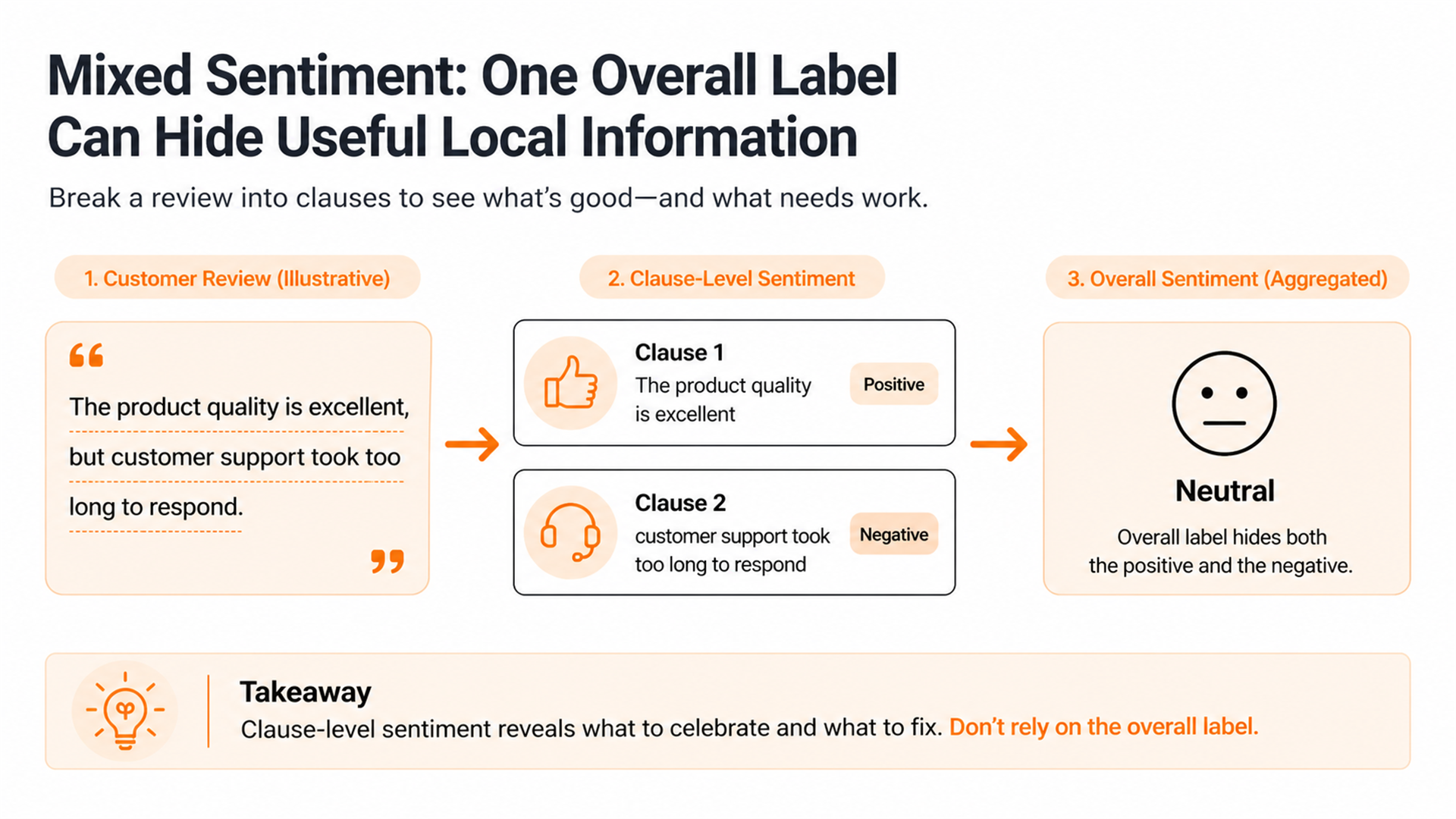
Yes. This is one of the main reasons to inspect phrase-level evidence instead of stopping at an overall label.
Amazon Comprehend explicitly includes a Mixed sentiment class for text expressing both positive and negative sentiment. (Amazon Comprehend) Google Cloud can also return sentiment at both document and sentence level, which helps expose variation inside a longer passage. (Google Cloud Natural Language)
Consider: "The software is excellent, but support took three days to answer."
| Phrase | Likely meaning |
|---|---|
| "The software is excellent" | Positive product sentiment |
| "support took three days to answer" | Negative support sentiment |
If you only keep one overall score, you risk losing the part that tells your team what to improve.
The problem grows when one message covers several topics, such as pricing, onboarding, product features, and support. For a one-off analysis, inspect the key phrases. For larger research programs, consider whether you need aspect-level or targeted sentiment analysis, where sentiment is linked to specific products, features, services, or entities.
When is AI sentiment analysis most likely to get the meaning wrong?
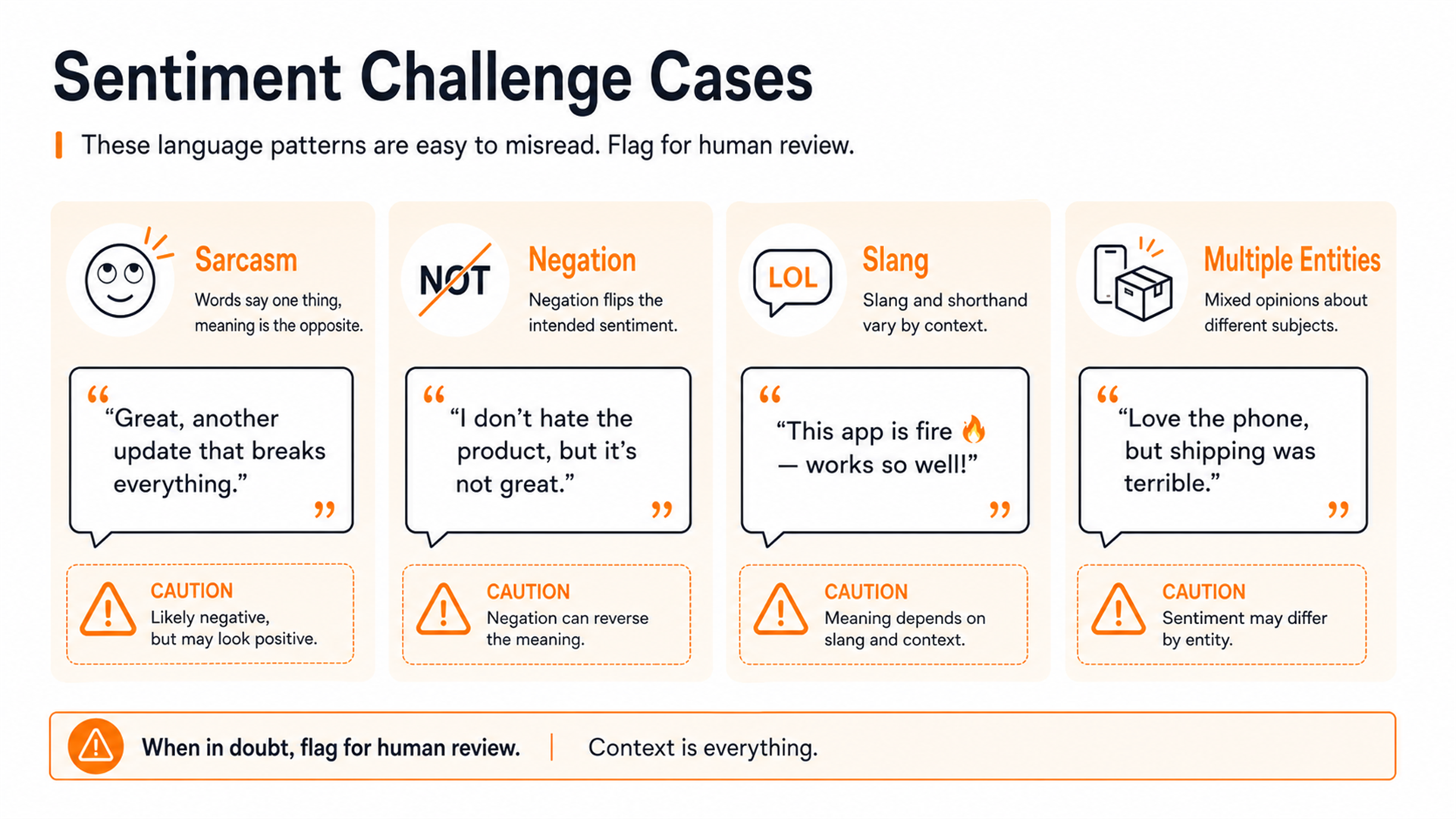
Sarcasm and irony
"Amazing job shipping the update right before everything broke."
Negation and understatement
"This is useful" and "This is not useful" contain nearly the same words but opposite meaning. Understatement can also hide strong criticism, as in "Not exactly the smoothest launch."
Slang and community language
Terms can change meaning across communities. "That feature is sick" may be praise, not criticism.
Multiple entities
"We switched from Vendor A because their support was terrible. Vendor B has been excellent so far." A document-level result does not tell you which sentiment belongs to which vendor unless the system connects each opinion to its target.
Very short text
Messages such as "Fine." or "Sure." contain little evidence and may depend on the surrounding conversation.
BrandJet's broader sentiment analysis feature also notes that straightforward praise and complaints are easier cases while sarcasm and mixed sentiment are harder.
A useful rule is:
Human review priority = business impact multiplied by ambiguity
High-impact or ambiguous text tied to an important customer, reputation issue, or major decision should be read directly.
When should you use a free sentiment analyzer instead of a monitoring platform?
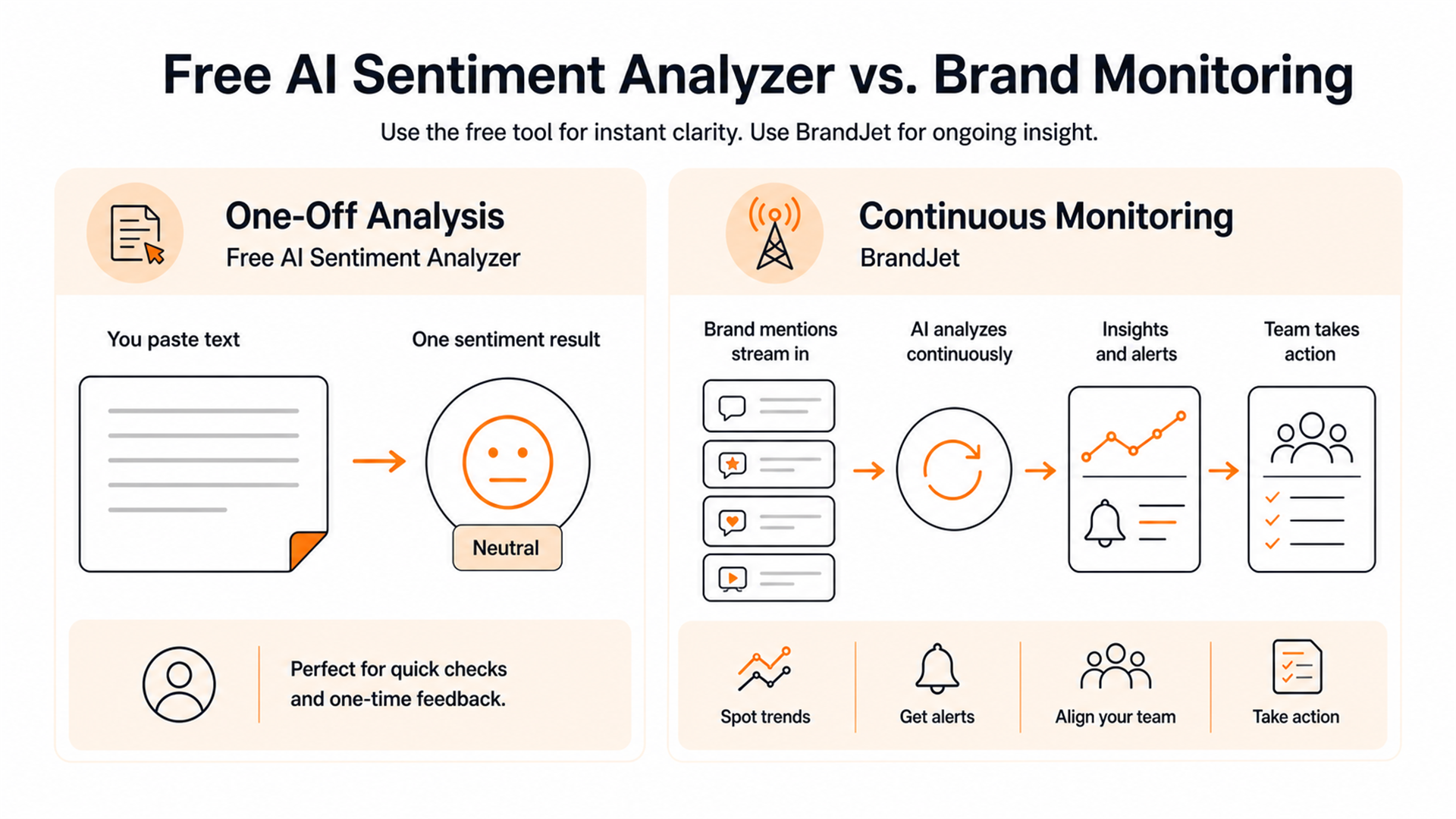
A paste-in analyzer helps you interpret text you already have. A monitoring platform helps you find, classify, organize, and act on text continuously.
| Need | Free analyzer | Continuous monitoring |
|---|---|---|
| Analyze one review | Best fit | Usually unnecessary |
| Check one customer email | Best fit | Usually unnecessary |
| Explore a small manual sample | Good fit | Optional |
| Automatically collect brand mentions | No | Yes |
| Track sentiment over time | Manual only | Yes |
| Alert a team about negative mentions | No | Yes |
| Compare channels or topics | No | Yes |
| Maintain ongoing workflows | No | Yes |
The free sentiment analyzer handles one-off text analysis. The broader BrandJet sentiment analysis feature is positioned around automatically scoring monitored mentions, tracking changes over time, filtering mentions, and viewing sentiment across platforms or topics.
If you first need to find where people are discussing your brand, use the AI brand mention scanner, which currently describes scanning X, Reddit posts and comments, and major news sites.
For vendor evaluation, use the comparison of the best AI sentiment analysis tools. For reporting ideas, see these sentiment analysis dashboard examples.
How should teams validate sentiment before making a business decision?
Use this five-step review process.
1. Read the original text
If the decision matters, confirm the classification against the actual message.
2. Inspect the phrases behind the result
Look for the object of the praise or criticism. "Love the product, hate the price" should not become a vague observation that customers are neutral.
3. Separate sentiment from intent
Negative sentiment does not automatically mean churn, and positive sentiment does not automatically mean purchase intent.
4. Manually inspect ambiguous cases
Prioritize human review for sarcasm, mixed feedback, short responses, industry slang, multiple entities, high-value customers, crisis-sensitive messages, and classifications that do not match the wording.
5. Track corrections when sentiment becomes a workflow
If your team repeatedly disagrees with automated classifications, record why.
| Text ID | AI result | Human label | Main disagreement | Action |
|---|---|---|---|---|
| 001 | Negative | Negative | None | Accept |
| 002 | Positive | Negative | Sarcasm | Correct |
| 003 | Neutral | Mixed | Conflicting clauses | Review |
For a labeled evaluation set:
Accuracy = correctly classified examples / total labeled examples
Do not publish an accuracy percentage without explaining the dataset, labeling method, and test conditions.
FAQ
What is a sentiment analyzer?
A sentiment analyzer uses computational language analysis to infer the evaluative direction of text.
Is the BrandJet sentiment analyzer free?
The current BrandJet page is published as a free sentiment analyzer with the paste-in interface on the tool page. Check the live tool for current usage conditions.
Can I analyze customer reviews with it?
Yes. Review is one of the currently available text types, alongside General, Tweet, Email, and Comment. For mixed reviews, inspect supporting phrases instead of relying only on the overall score.
Can sentiment analysis detect sarcasm?
Sometimes, but not reliably enough for an absolute guarantee. Manually review sarcastic, ambiguous, or high-impact examples.
What does neutral sentiment mean?
Neutral usually means the system did not find strong positive or negative evidence under its classification method. It does not mean the text is unimportant. "Your API will be deprecated next month" may sound emotionally neutral while being operationally urgent.
What is the difference between sentiment and emotion analysis?
Sentiment describes broad evaluative direction, such as positive or negative. Emotion analysis attempts to identify more specific emotional categories. BrandJet's current free tool exposes both an overall sentiment score and an eight-emotion breakdown.
Can I use a free sentiment analyzer for brand monitoring?
You can use it to manually analyze individual mentions you already have. If you need automatic collection, alerts, history, trend tracking, or team workflows, move to continuous BrandJet sentiment analysis or start by finding public conversations with the AI brand mention scanner.
The decision is straightforward: analyze one text when you need an answer now; monitor continuously when you need to know what changes next.